Skip to content
EDU-v01Available

Education: run admissions to report cards, and fees you can account for, in one system.

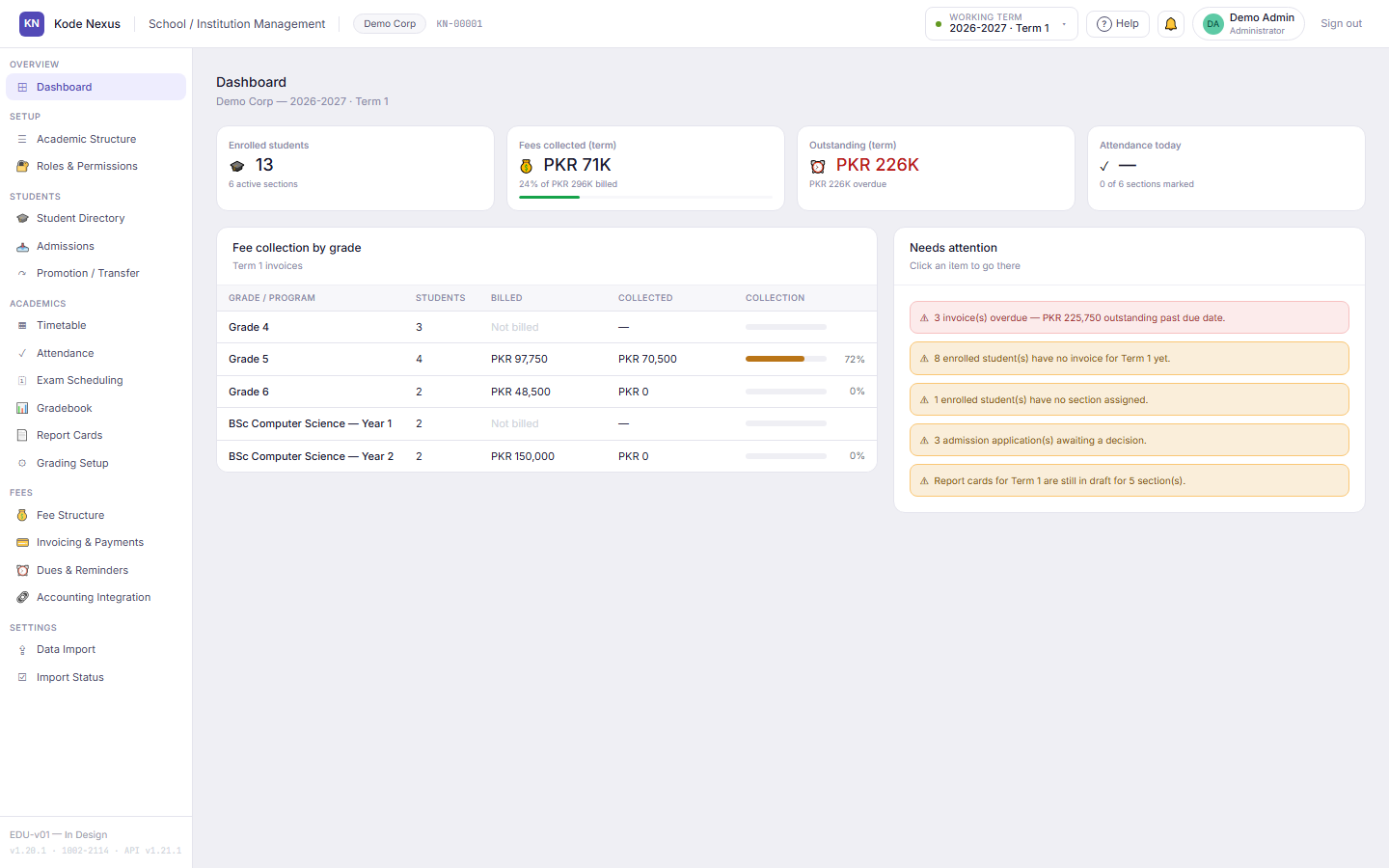
EDU-v01 brings your academic year, students, timetable, attendance, marks, report cards and fees into one cloud app. Discounts need a reason and an approver, invoices are computed rather than typed in, and every change records who made it.

The EDU-v01 dashboard showing enrolled students, fees collected and outstanding for the term, fee collection by grade, and a needs-attention list.

Why teams choose EDU-v01

  • Fees nobody can quietly change

    Discounts and waivers need a reason and an approver. Invoices are computed from your fee structure, never typed in.

  • Every change has a name on it

    Field-level history shows which staff member changed what, and when, on every record.

  • Timetables in one click

    Generate the whole school's week without double-booking a teacher, room or section, then fine-tune by hand.

  • Switch from spreadsheets

    One generated Excel template brings your students, guardians, marks and opening balances across, checked before anything is saved.

01

One academic structure for schools and colleges

Set up academic years and terms, grade levels or degree programs, subjects, sections and rooms once. Every other screen builds on it. Grading can be a percentage, a letter or a GPA, chosen per program.

  • K-12 grades and sections, or programs and courses, in the same model
  • Records in use can't be deleted; the system names what still depends on them
  • Deleted records are kept and logged, never erased
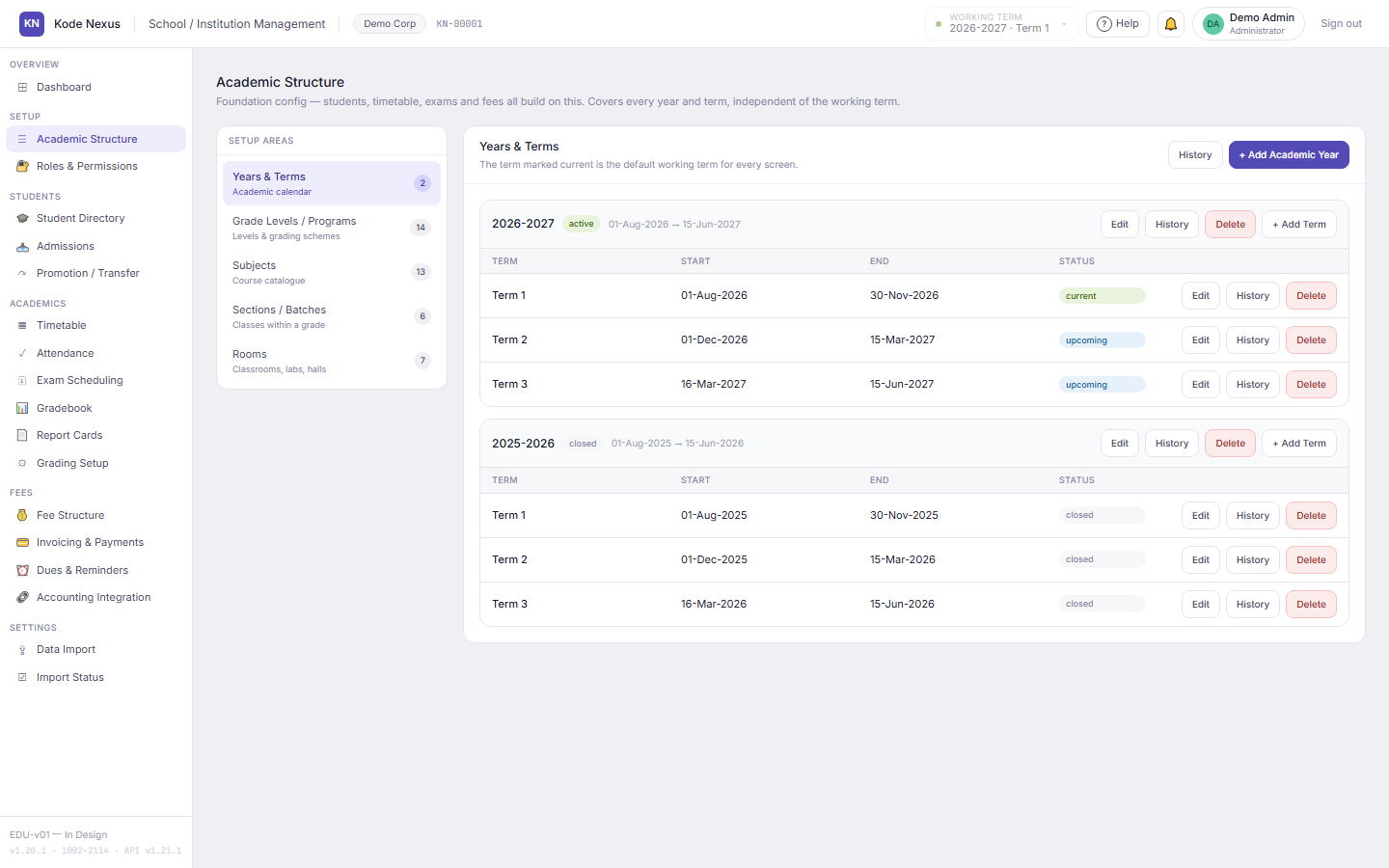
Academic Structure screen listing the academic year, terms, grade levels, programs, subjects, sections and rooms.

02

Students and guardians in one profile

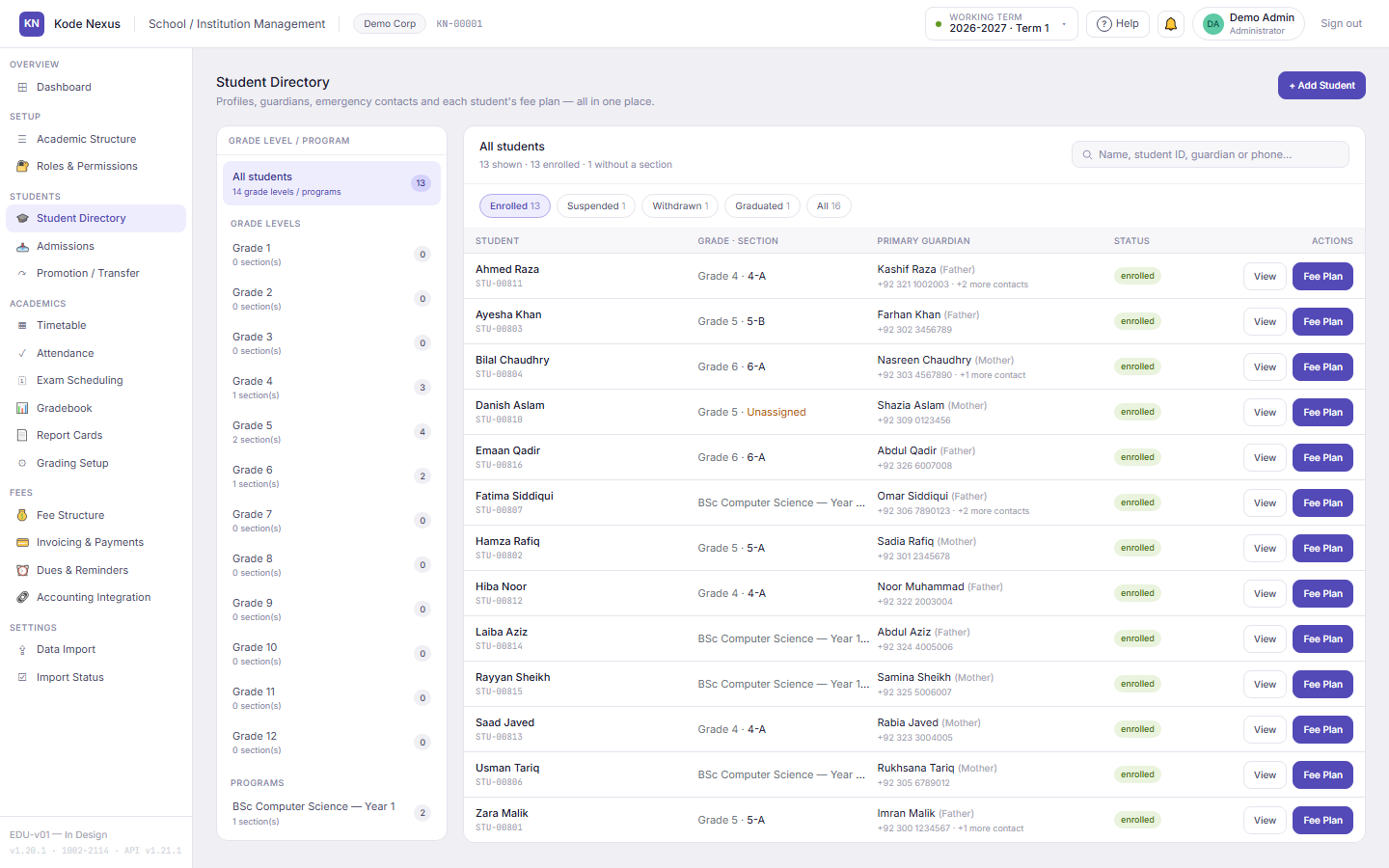
The student directory keeps each student's profile, guardians and emergency contacts together, with a history of every change. Section transfers, withdrawals and yearly promotion are recorded steps, not silent edits.

  • Promotion moves a student up exactly one level, at most once a year
  • Transfers and withdrawals are logged with the date and reason
  • A section can't be filled beyond its capacity
Student Directory with grades in a side list and students with their sections and guardians.

03

An admissions pipeline that ends in enrolment

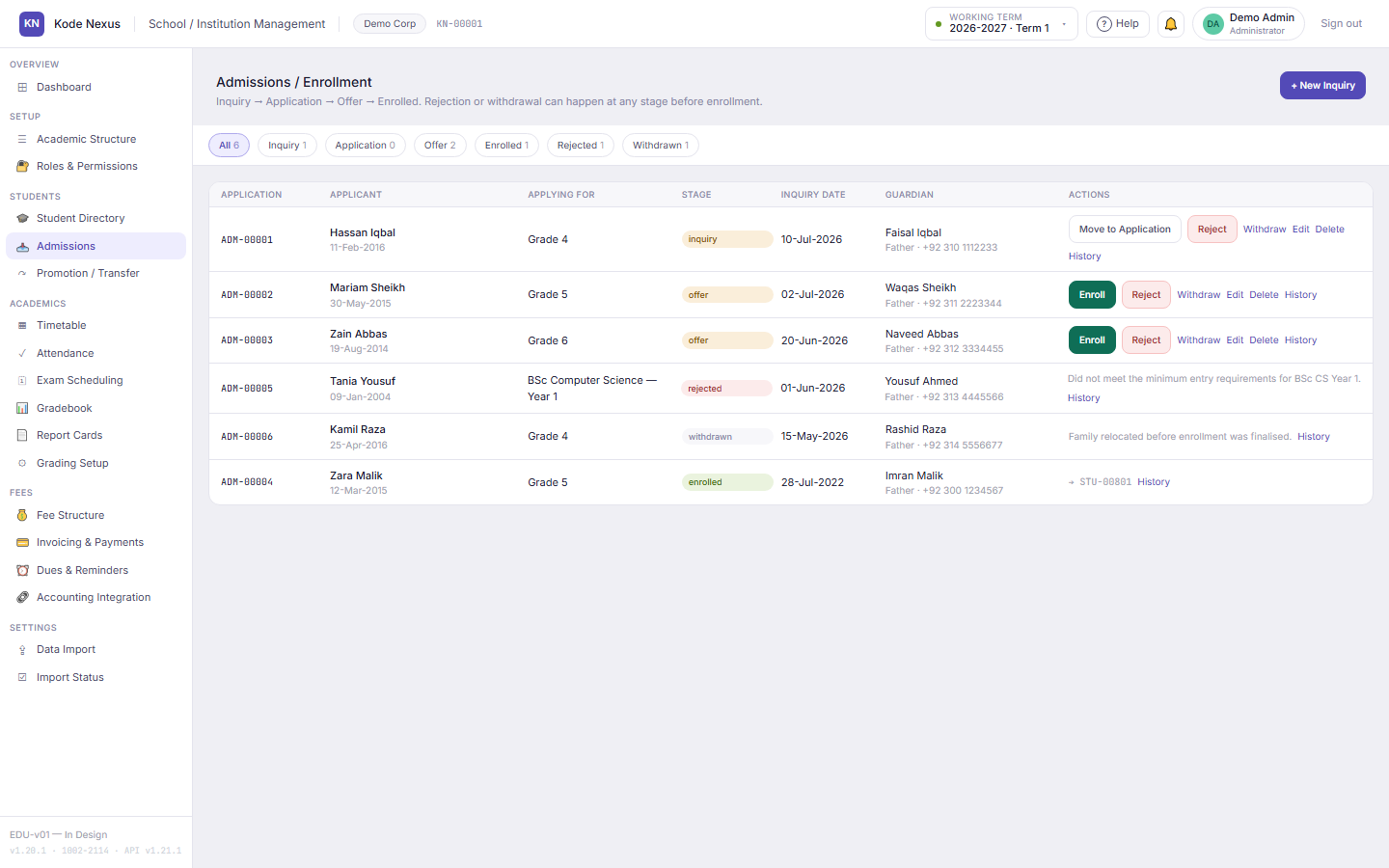
Track every applicant from inquiry to application, offer and enrolment. Each stage moves one step forward. Rejections and withdrawals keep their reason, and enrolling creates the student record in the same step.

  • Duplicate applicants are caught before they're created
  • Every application has its own change history
Admissions screen showing applications at the inquiry, application, offer and enrolled stages.

04

The whole timetable, generated without clashes

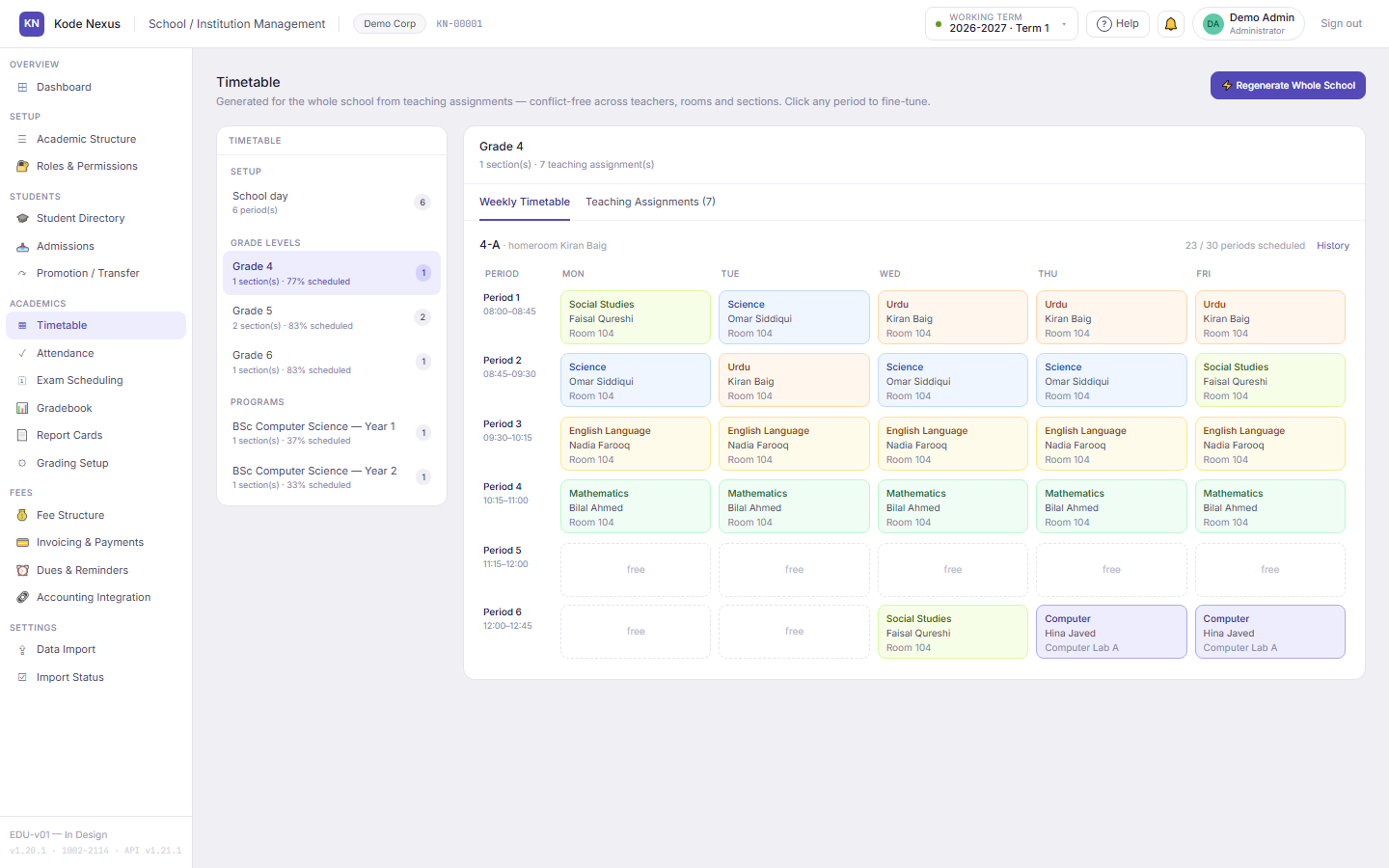
Enter who teaches what to which section and how many periods a week. One click schedules the whole school at once, so no teacher, room or section is ever booked twice in the same period. Anything that can't fit is reported to you, not silently dropped.

  • Subjects are spread across the week where possible
  • Fine-tune any period on the grid, with the same clash rules applied
Weekly timetable grid for section 4-A with subjects, teachers and rooms for each period.

05

Attendance by day or by period

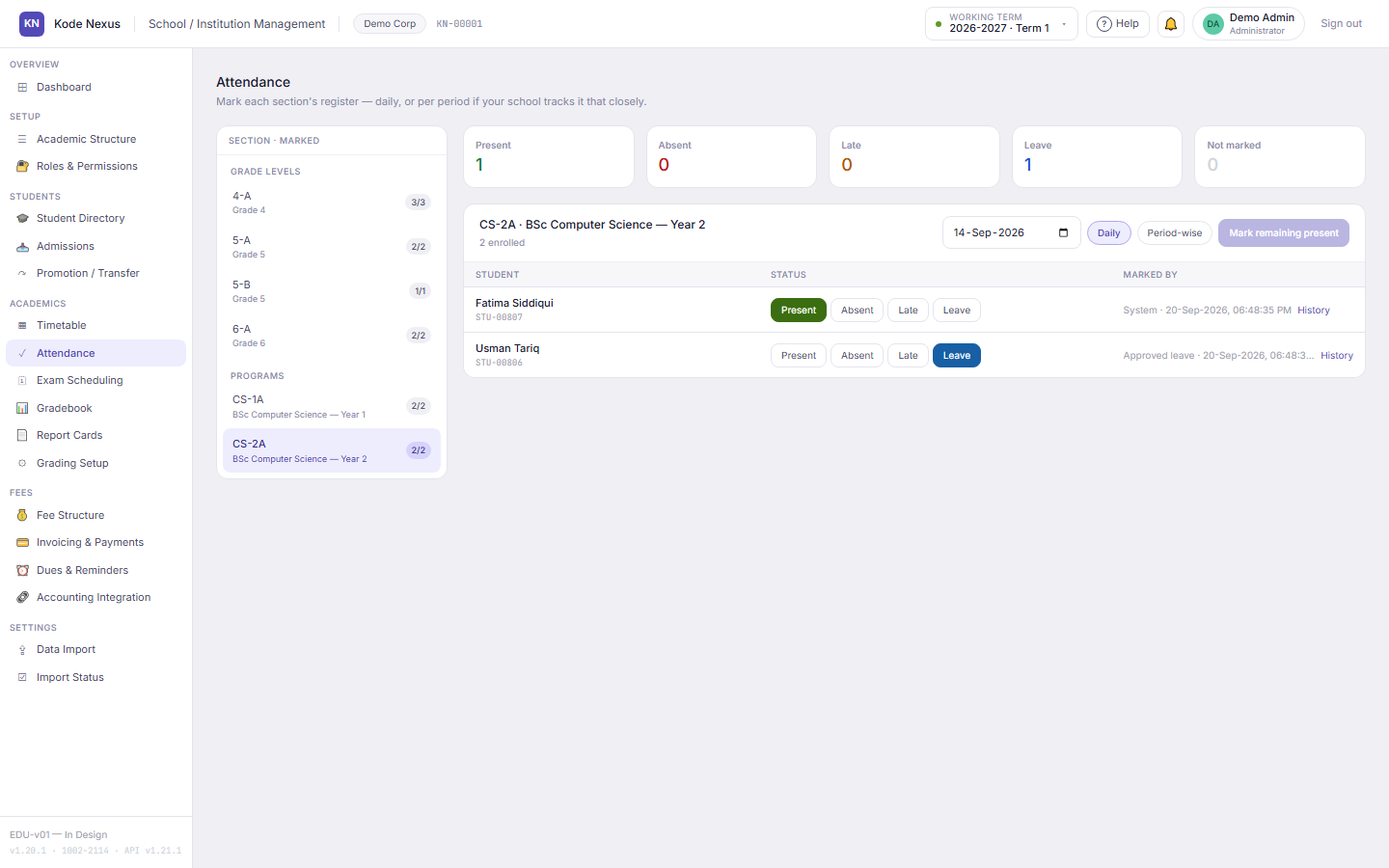
Mark a section's register daily, or period by period where the timetable has a class. A correction updates the mark and keeps its history. Approving a leave request marks the register as leave for every school day it covers.

  • No marking in the future or outside the academic year
  • Only students enrolled in the section appear on its register
Attendance register for section CS-2A with one student present and one on approved leave.

06

Grading, gradebook and report cards that agree

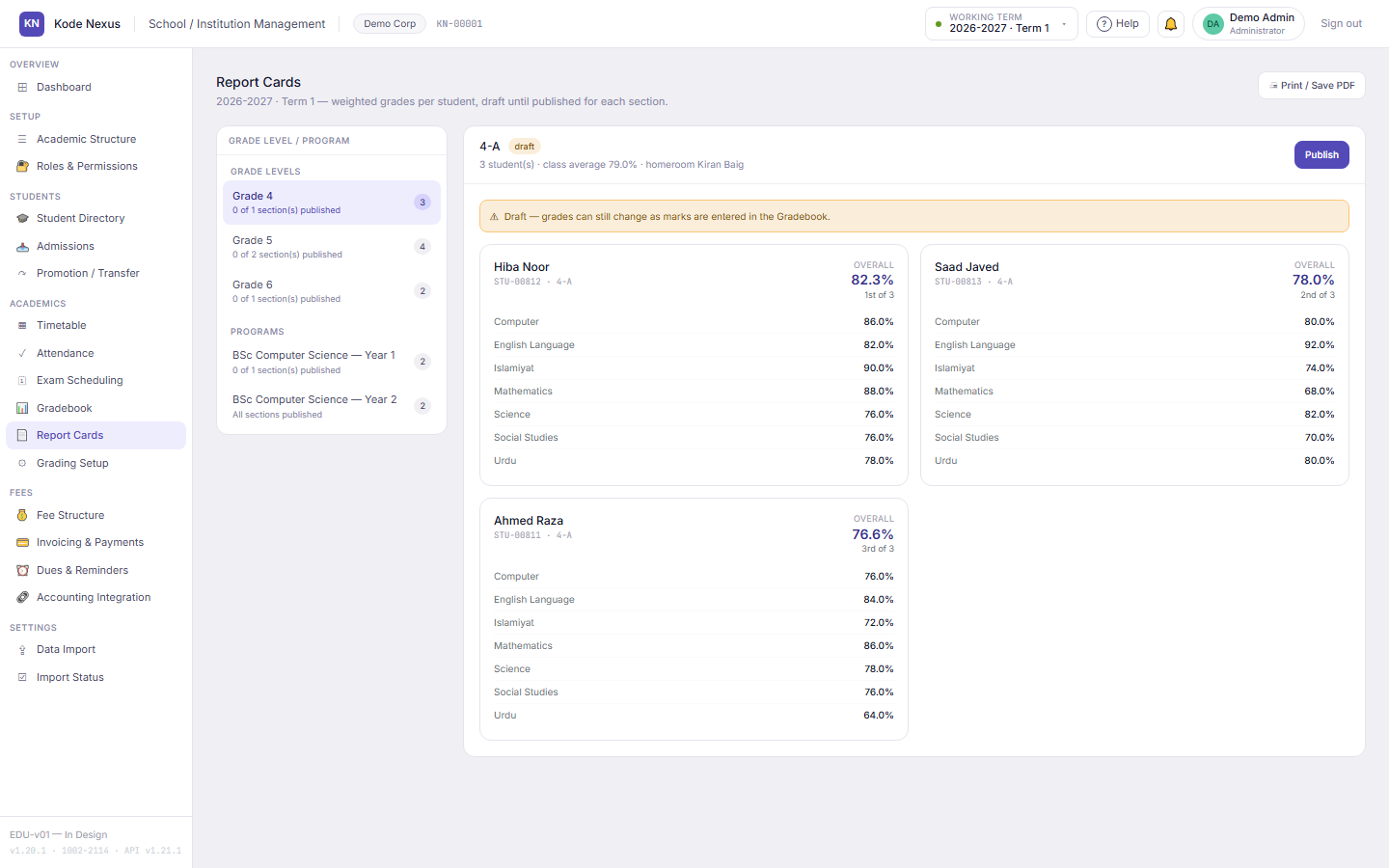
Define assessment types and their weightage per program, and grade bands for letter or GPA grading. Teachers enter one mark per student, subject and assessment. Report cards use the same calculation, including class position, so the two never disagree.

  • An incomplete grading setup is kept as a draft and the reason is shown
  • Publish report cards per section, with who published and when
  • A card shows "changed since published" if marks change afterwards
Report Cards screen listing sections with their publication status for the working term.

07

A fee structure, with discounts that need approval

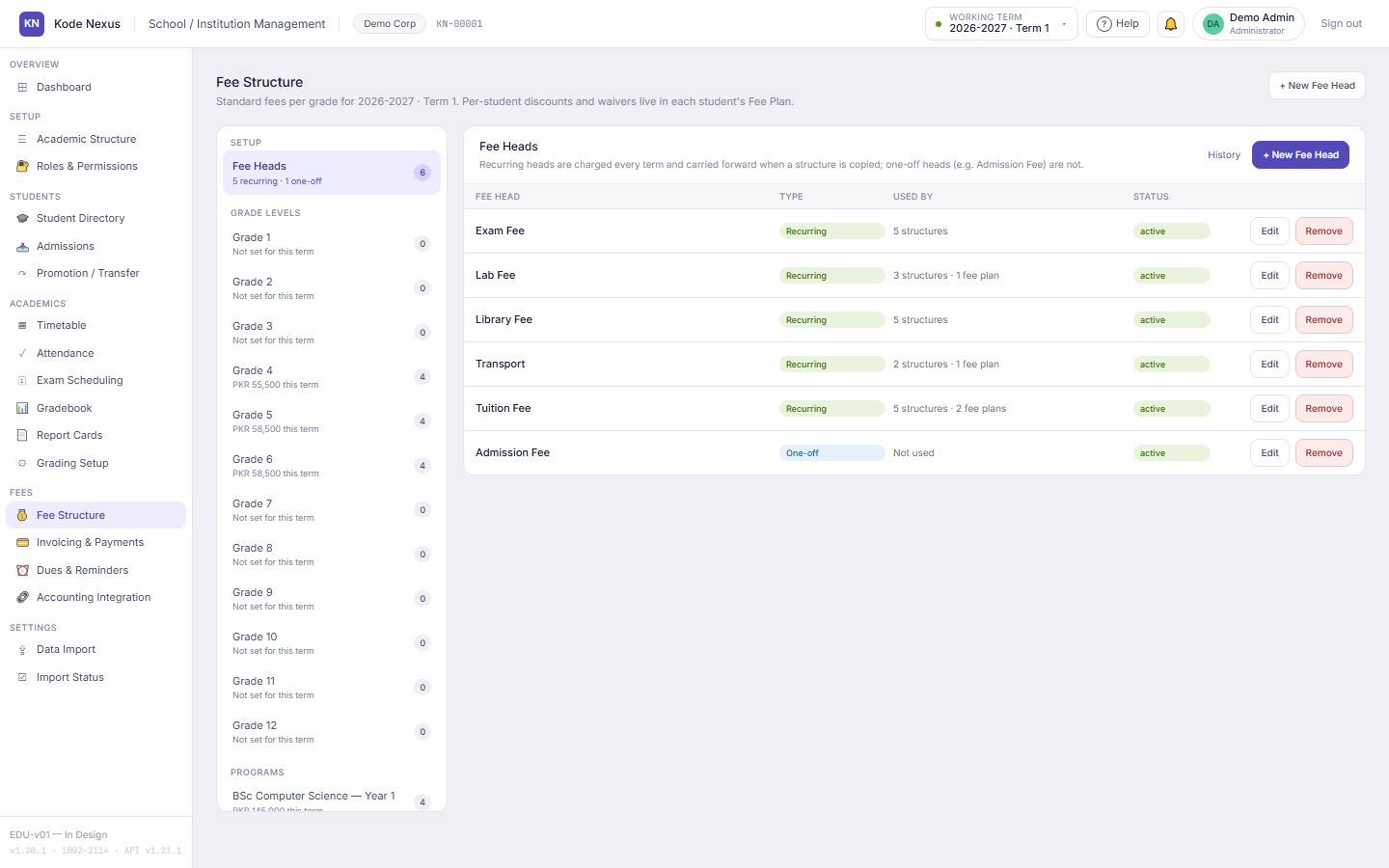
Set each grade's fees per term from a catalogue of fee heads, and copy them from another term in one step. Per-student discounts, waivers and one-off charges carry dates, a reason and an approver. Approving a discount is a separate permission from managing fees.

  • Two discounts on the same fee head for the same dates are refused
  • What a student will pay is previewed using the same calculation as the invoice
Fee Structure screen with fee heads and amounts for a grade in the working term.

08

Invoices, receipts and dues you can trust

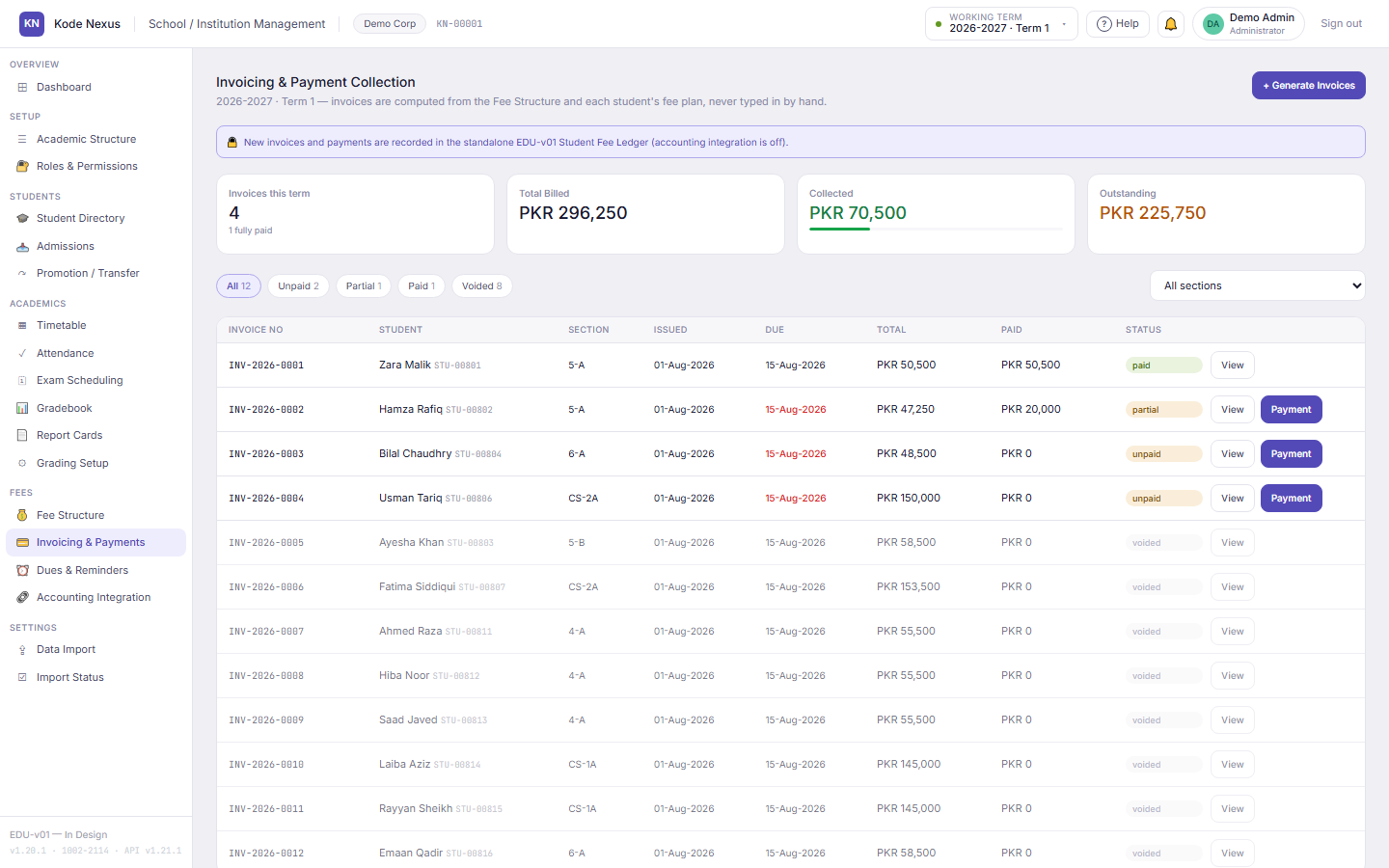
Generate a section's or the whole school's invoices in one step, numbered without gaps. An issued invoice is never edited. A wrong one is voided with a reason and issued again. Payments get receipts, and over-payment is refused.

  • Dues are aged as of any date (not yet due, 1–30, 31–60 and 60+ days), with earlier terms' arrears
  • Every reminder your staff send is logged with the guardian, channel, date and sender
Invoicing and Payment Collection screen with numbered invoices, totals billed, collected and outstanding.

09

Exams scheduled without clashes

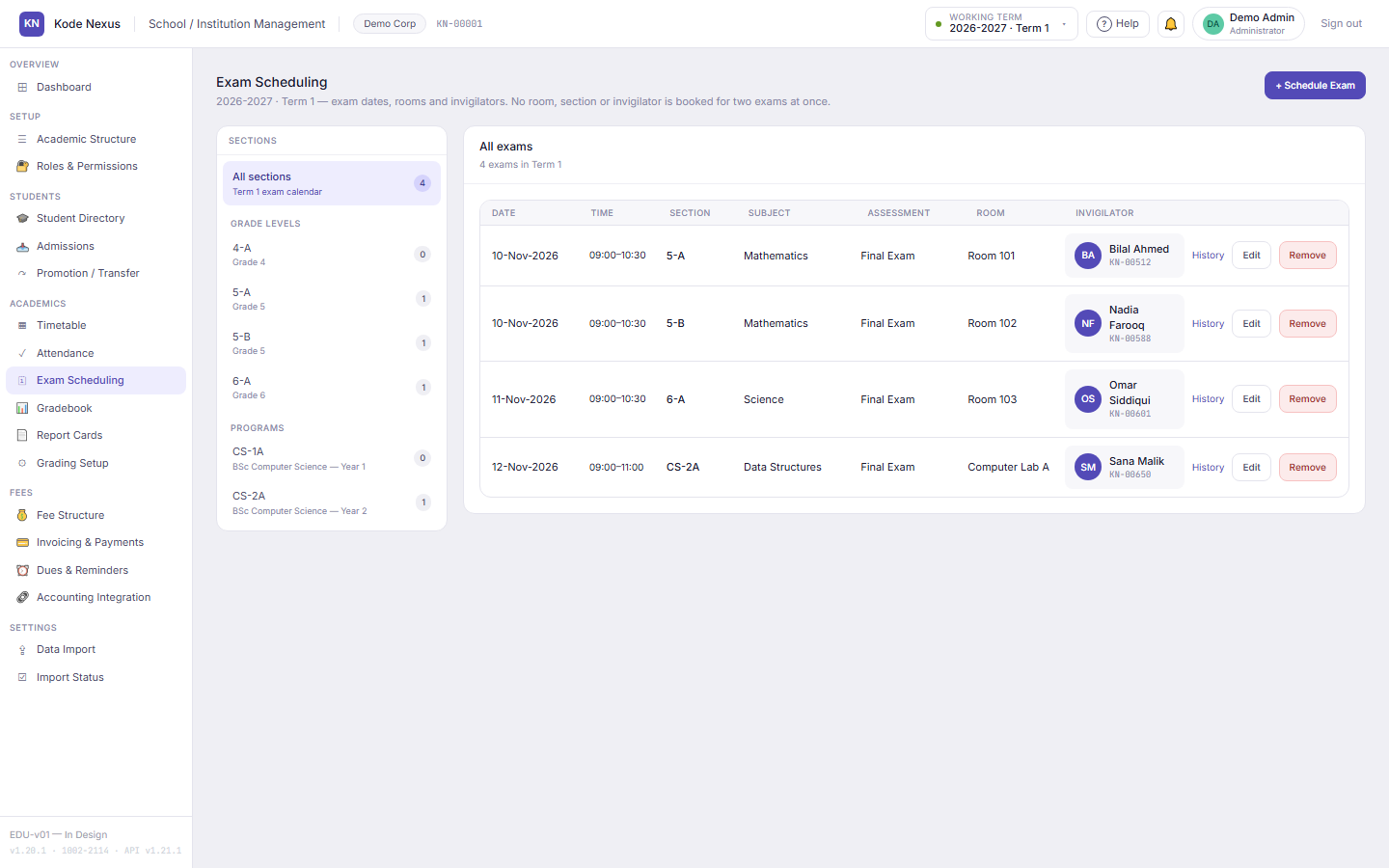
Schedule each exam inside the term, on a weekday, and EDU-v01 refuses a room, section or invigilator booked for two exams at once. Rescheduling keeps its history.

Exam Scheduling calendar for the working term with exams per section and subject.

10

Bring your data across in days, not months

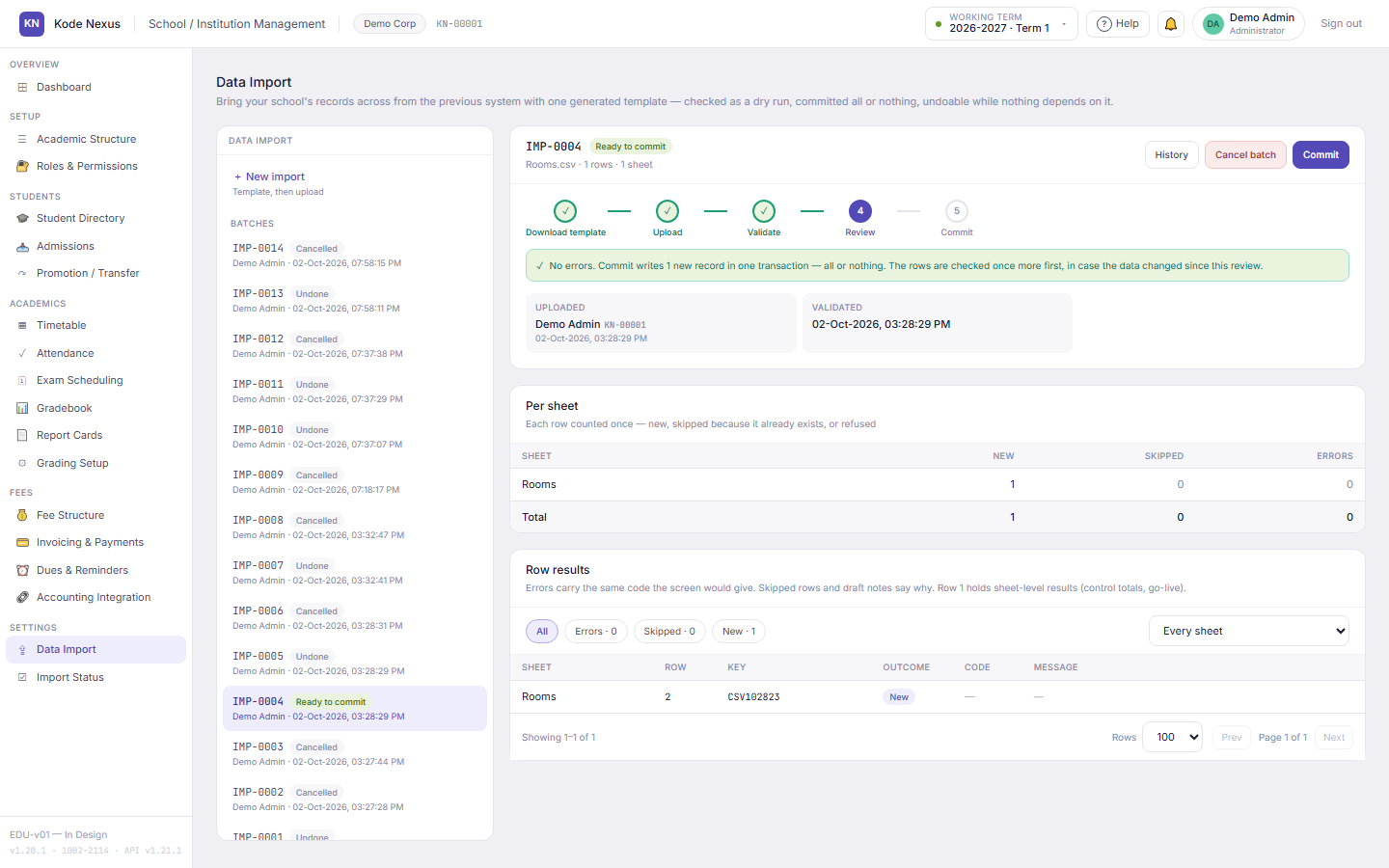
Download a template made for your school, fill it from your old system, and upload it. EDU-v01 checks every row with the same rules as its screens and shows you the results before anything is saved. Then it imports everything or nothing, and can undo an import while nothing depends on it yet.

  • Students, guardians, timetable assignments, grading, marks and fees
  • Opening balances must add up to your old system's totals before they're accepted
  • Our onboarding team can run the import for you, with access you grant for 14 days
Data Import screen with an import batch ready to commit and its per-sheet counts.

11

Roles for every job, and a full audit trail

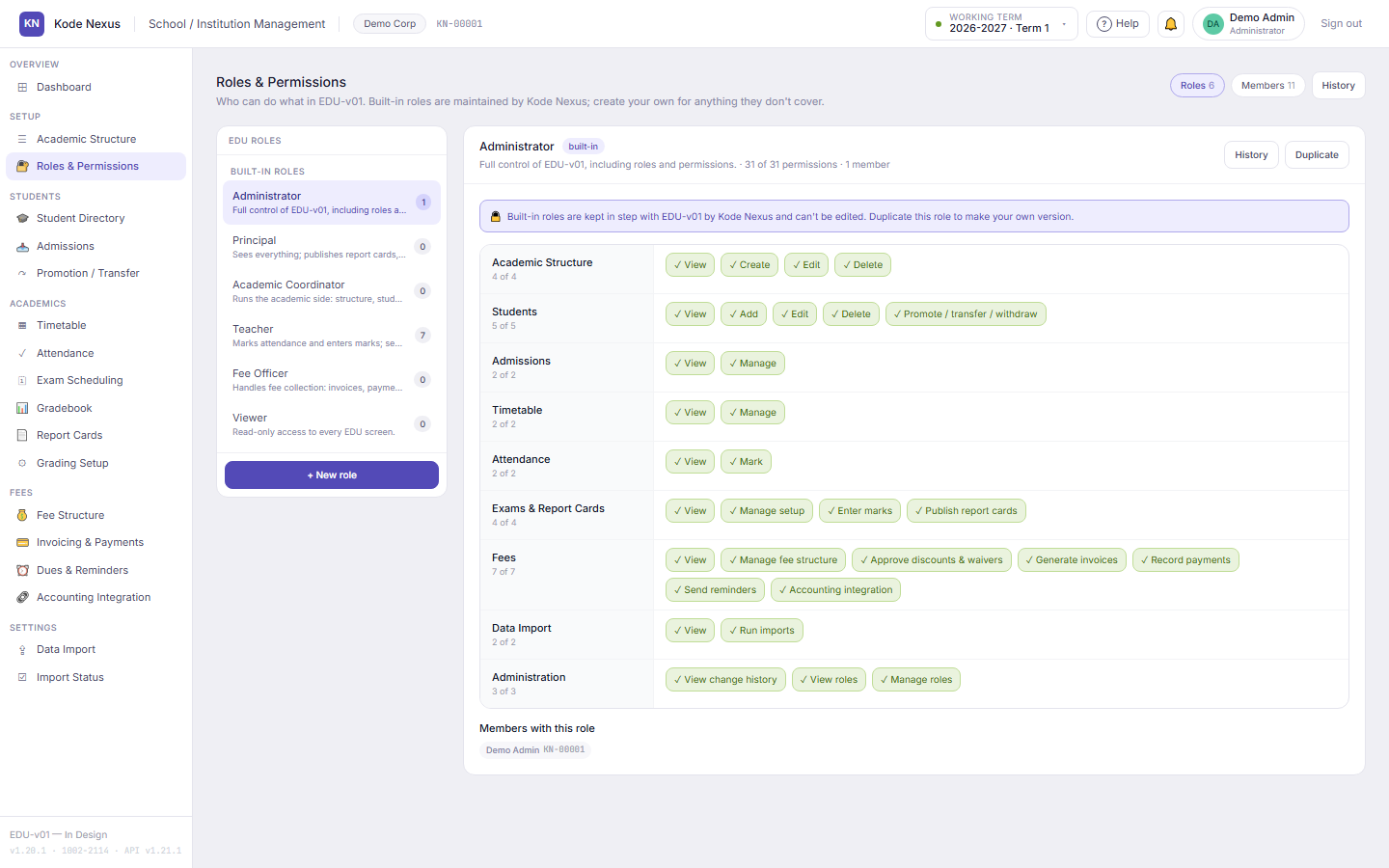
Six built-in roles cover administrators, principals, academic coordinators, teachers, fee officers and viewers, and you can create your own. Each member sees only what their role allows. Every change records the person's KN ID.

Roles and Permissions screen with the EDU-v01 permission matrix for each role.

Product tour

See EDU-v01 at work

Real screens from EDU-v01, with the demo organisation’s data.

From inquiry to enrolled

Every applicant moves one stage at a time, and enrolling creates the student record.

Admissions pipeline with applications at each stage.

One profile per student

Guardians, emergency contacts, section history and fees, all in one profile with a change history.

Student Directory with grades in a side list.

Generate the whole week

The whole school is scheduled at once, so no teacher, room or section is ever double-booked.

Weekly timetable grid generated for section 4-A.

Registers in seconds

Daily or period-wise registers, and approved leave marks the register automatically.

Attendance register with present and leave marks.

Bills you can stand behind

Invoices computed from your fee structure and approved discounts, with receipts and no gaps in numbering.

Invoices with totals billed, collected and outstanding.

Built for

  • Primary and secondary schools
  • Colleges and universities
  • Academies and coaching centres
  • Schools moving off spreadsheets

EDU-v01 questions

Can we bring our existing records across?

Yes. EDU-v01 generates an Excel template for your school covering students and guardians, your academic structure, teaching assignments, grading, marks, fee heads, fee structure and opening balances. It checks every row before anything is saved, then imports everything or nothing. Our onboarding team can run the import for you while your owner grants them access for 14 days.

Does it work for colleges as well as schools?

Yes. The same academic structure handles grade levels and sections or degree programs and courses, and each program can grade by percentage, letter or GPA.

Can a staff member give a discount without approval?

No. Every discount, waiver or extra charge needs a reason, dates and an approver, and approving one is a separate permission from managing fees. Invoices are computed, never typed in, and every change records who made it.

Does EDU-v01 send fee reminders by SMS or WhatsApp?

Not yet. Today EDU-v01 shows exactly who owes what and for how long, and logs every reminder your staff send by email, SMS or phone, with the guardian, the date and the sender. Sending reminders from the app is not built yet.

Do we need the Accounting module as well?

No. Fees run on EDU-v01's own fee ledger. Posting fees to the Accounting module (ACC-v01) will be an option you switch on once that module launches.

Is there a parent portal?

Not today. A portal where guardians see attendance, grades and dues is on our roadmap as a separate app. It isn't part of EDU-v01 yet.

Which currency does it use?

Fee amounts are in Pakistani rupees (PKR), to the paisa.

Talk to us about EDU-v01

Tell us about your organisation and we’ll show you EDU-v01 with your own situation in mind.

  • We reply within one business dayMonday to Friday, 9:00 to 18:00 (PKT, UTC+5)
  • Prefer email?sales@kodenexus.com
  • Moving from spreadsheets?Tell us what you use today and we’ll explain how your data comes across.

Include the country code, e.g. +92 300 1234567

We use your details only to reply. See our privacy policy.